Vue中svg图片引入的两种方式
1、vue文件中写入svg方法
A. 创建图标目录
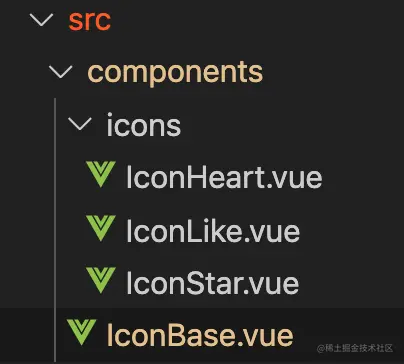
B. IconBase.vue内容如下
<template>
  <svg
    xmlns="http://www.w3.org/2000/svg"
    :width="width"
    :height="height"
    viewBox="0 0 18 18"
    :aria-labelledby="iconName"
    role="presentation"
  >
    <title :id="iconName" lang="en">{{ iconName }} icon</title>
    <g :fill="iconColor">
      <slot />
    </g>
  </svg>
</template>

<script>
export default {
  props: {
    iconName: {
      type: String,
      default: "heart",
    },
    width: {
      type: [Number, String],
      default: 18,
    },
    height: {
      type: [Number, String],
      default: 18,
    },
    iconColor: {
      type: String,
      default: "currentColor",
    },
  },
};
</script>

<style scoped>
svg {
  display: inline-block;
  vertical-align: baseline;
  margin-bottom: -2px;
}
</style>
C. 以IcoonHeart.vue为例,内容如下:
<template>
  <path d="M11.8 1c-1.682 0-3.129 1.368-3.799 2.797-0.671-1.429-2.118-2.797-3.8-2.797-2.318 0-4.2 1.882-4.2 4.2 0 4.716 4.758 5.953 8 10.616 3.065-4.634 8-6.050 8-10.616 0-2.319-1.882-4.2-4.2-4.2z"></path>
</template>
D. js中引入Icon组件
import IconBase from '../../components/IconBase.vue';
import IconHeart from '../../components/icons/IconHeart.vue';
new Vue({
  components: {
    IconBase,
    IconHeart,
  },
})
E. 页面template中使用
<icon-base width="24" height="24" icon-color="#E15E7D" v-if="iconType === 1">
  <icon-heart />
</icon-base>
2、 webpack中配置svg格式的打包支持
A. 安装svg-sprite-loader
npm i svg-sprite-loader -D
B. webpack配置中增加对svg格式的编译支持
支持特定目录下svg文件的解析编译
{
  test: /.svg$/,
  loader: "svg-sprite-loader",
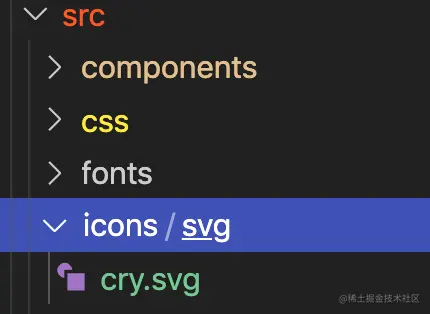
  include: [path.resolve(__dirname, '../src/icons/svg')],
},
之前配置的字体svg文件解析中排除特定目录下的svg文件,避免编译时应用到该规则
{
  test: /.(ttf|woff|eot|svg|woff2)(?[sS]+)?$/,
  exclude: [
    path.resolve(__dirname, '../src/icons/svg'), //排除字体图标文件
  ],
  use: [
    process.env.NODE_ENV === 'production'
      ? `url-loader?limit=20000&name=${path.posix.join(config.build.assetsSubDirectory, 'plugin/font/[name].[ext]?[hash]')}`
      : `url-loader?limit=20000&name=${path.posix.join(config.dev.assetsSubDirectory, 'plugin/font/[name].[ext]?[hash]')}`
  ]
}
C. svg格式文件的存放目录
D. svg展示组件SvgIcon
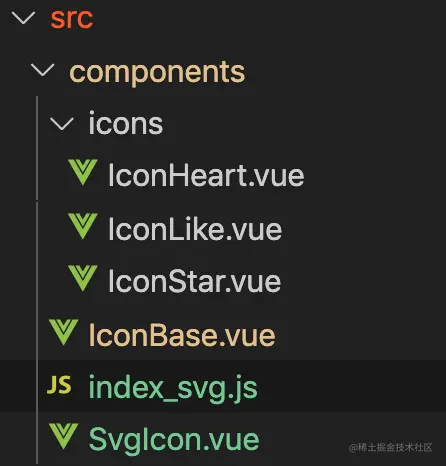
组件内容:
<template>
    <svg :class="svgClass" aria-hidden="true" @click="$emit('click')">
        <use :xlink:href="iconName"></use>
    </svg>
</template>

<script>

 * svg 图标组件
 * iconClass="图标名称"
 * className="风格名称"
 */
export default {
  name: 'svg-icon',
  props: {
    iconClass: { type: String, required: true },
    className: { type: String }
  },
  computed: {
    iconName () {
      return `#${this.iconClass}`
    },
    svgClass () {
      if (this.className) {
        return 'svg-icon ' + this.className
      } else {
        return 'svg-icon'
      }
    }
  }
}
</script>

<style scoped>
.svg-icon {
  width: 1em;
  height: 1em;
  vertical-align: -0.15em;
  fill: currentColor;
  overflow: hidden;
}
</style>
E.注册SvgIcon component, 并引入所有需要的svg文件
import Vue from 'vue'
import SvgIcon from './SvgIcon.vue';


Vue.component('svg-icon', SvgIcon)
const requireAll = requireContext => {


  requireContext.keys().map(requireContext);
}
const req = require.context('../icons/svg', false, /.*.svg$/)
requireAll(req)
F.入口文件中引入
import '../../components/index_svg.js';
G.页面中使用
<svg-icon icon-class="cry"/>
两种方式优缺点
第一种方式不用安装
svg-sprite-loader,也无需配置webpack中针对svg格式文件的打包规则,这块比较方便;但缺点是每次增加svg格式文件都需要在component/icons下增加一个对应vue文件,并且需要同步更新主文件中相对该文件的引入,使用起来不是很方便。第二种方式安装配置这块稍微需要点时间,但整体来说使用方便,个人比较推荐~
许可协议:
CC BY 4.0